
Определили ваш договор
Он заключён с ООО «Интернет Решения». Если есть другой договор, сможете переключиться на него в боковом меню
Where your product will end up after it’s cancled, unredeemed, or returned depends on its price, quality, and your settings in your account.
| Where the product is sent to | What is indicated in the Delivery Service field | What this means |
|---|---|---|
| Via WHD warehouse | Ozon | Ozon delivers canceled, unclaimed, and returned products to the warehouse for resale. Sending via the warehouse is set up by default. |
| To the partner warehouse | Name of the logistics or return partner | Canceled products are handed over to the carrier who delivered them to the customer. Unclaimed products and customer returns are handed over to your return partner. You decide how to proceed after the handover: pick the products up, dispose of them, or leave them for storage. |
| For disposal | Disposal | The product is handed over to the disposal company. |
| To the seller’s warehouse | In the “Delivery Service” field - By agreement | For customer returns only. The customer sends the product themselves to the address you provided in the return request. The method is available to the customer if the product was delivered to CIS countries, there is no Ozon pick-up point in their area, or a bulky product is to be returned. |
To check where the product is sent to, go to Returns → realFBS and FBP Returns → the Delivery Service filter.
This feature is enabled by default for all orders delivered to Russia.
Canceled, unclaimed, and returned quality products will be sent via the WHD warehouse for resale.
The average order creation time is 3 to 14 days after the product is delivered to the warehouse. If the product fails to be sold within 120 days, it will be disposed of.
If a canceled, unredeemed, or returned product meets all the criteria at once, it will be sent via the WHD warehouse:
If a canceled order contains multiple items and at least one doesn’t meet the criteria, sending via the WHD warehouse will be unavailable.
You can disable and select a different returns setting:
Orders that customers return or cancel for reasons not related to defects or damage are considered quality returns and sent via the WHD warehouse for resale.
Before acceptance at the warehouse, we will double-check the returns and resell only products without defects or damage.
If the return reason is related to poor quality of the product, it will be sent for disposal. For example, if the product is damaged or isn’t working.
Learn more about disposal costs
Specify the manufacturer’s barcode (EAN) on the PDP or generate the Ozon barcode (OZN), then stick it on the product before shipping. We’ll accept the order at the warehouse with or without it, using the label on the package. However, in case of shortage or loss of such a product, we won’t be able to reimburse you for its cost.
Products delivered to the WHD warehouse for resale are reflected:
If the product is purchased again, it appears in the shipment details in Returns → WHD → WHD orders.
If a product in the repeat order is canceled, unredeemed, or returned, it appears in Returns → WHD → WHD Returns.
If a product is canceled, unredeemed, or returned once more, it can only be sent via the WHD warehouse.
Check the status in WHD Returns:
| Return status | Description |
|---|---|
| Awaiting shipment | The product is awaiting shipment from the Ozon pick-up point |
| On the way to the warehouse | The product is sent to the warehouse |
| At the warehouse | The product is accepted at the warehouse |
The return is disposed of if:
The list of products and the reason for the write-off will be reflected in Returns → WHD → Write-off products.
Learn more about disposal costs
Returns fees via the WHD warehouse are fixed in fees and tariffs.
The partner accepts the product and provides you with the opportunity to choose its next step: send it to your warehouse, dispose of it, or leave it for storage.
If the product doesn’t meet the criteria or you have disabled Sending Returns via WHD, the product will be sent to the partner warehouse provided:
for FBP and realFBS cancellations: the shipment cost exceeds 5000 rubles at the exchange rate as of the order creation date;
for unredeemed orders and customer returns under FBP and realFBS: the cost exceeds 5000 rubles at the exchange rate as of the order creation date, and you have selected a specific return partner in the warehouse settings.
If a partner is not selected, Ozon will appoint them automatically.
The shipments will be handed over to the delivery service that handled the shipping.
To return the product to your warehouse, contact the carrier yourself.
Read the partner terms and choose a partner who delivers to your country.
If you don’t make a decision within 14 days after the product arrives at the partner, the product will be disposed of at the provider’s warehouse.
Learn more about returns to the partner warehouse
Ozon disposes of canceled, unredeemed, and returned profducts in the following cases:
For FBP/realFBS cancellations:
In case of FBP/realFBS cancellations, Ozon doesn’t charge you for product disposal, and the rights and obligations for the product are transferred to the logistics partner.
For FBP and realFBS unredeemed orders and customer returns:
We will notify you about this in your Ozon account 7 days in advance. To prevent the method from being switched to disposal, use one of the available services in your provider account within 30 days.
If a product is canceled, unredeemed, or returned once more after resale via the WHD warehouse, certain disposal terms apply.
Available only for customer returns.
In case of return by agreement, the customer sends the return to your warehouse via mail or through a third-party delivery service. After approving the request, we’ll provide them with instructions with your address and phone number.
The return goes to your warehouse if:
To return products to your warehouse:
If you haven’t specified the warehouse address for returns or entered it incorrectly, the customer won’t be able to return the product.
In such cases, we request your address. If you don’t respond within 2 calendar days, we’ll refund the customer without requiring them to return the product.
Learn more about setting up a warehouse for receiving returns
If you agree, no action is required.
The setting is enabled by default for products that meet the criteria.
If you don’t agree, disable the setting for all returned products or specific product categories.
If the Return to Ozon Pick-up Points setting is available to you, select Send back or Dispose for unclaimed products and customer returns.
For one warehouse, you can only select one return method. The returns partner doesn’t depend on the choice of a logistics partner for the direct flow.
To do this, when editing or creating a warehouse, go to Logistics → Logistics Management in step 3 select the required provider in the “Returns to Ozon Pick-Up Points” block.
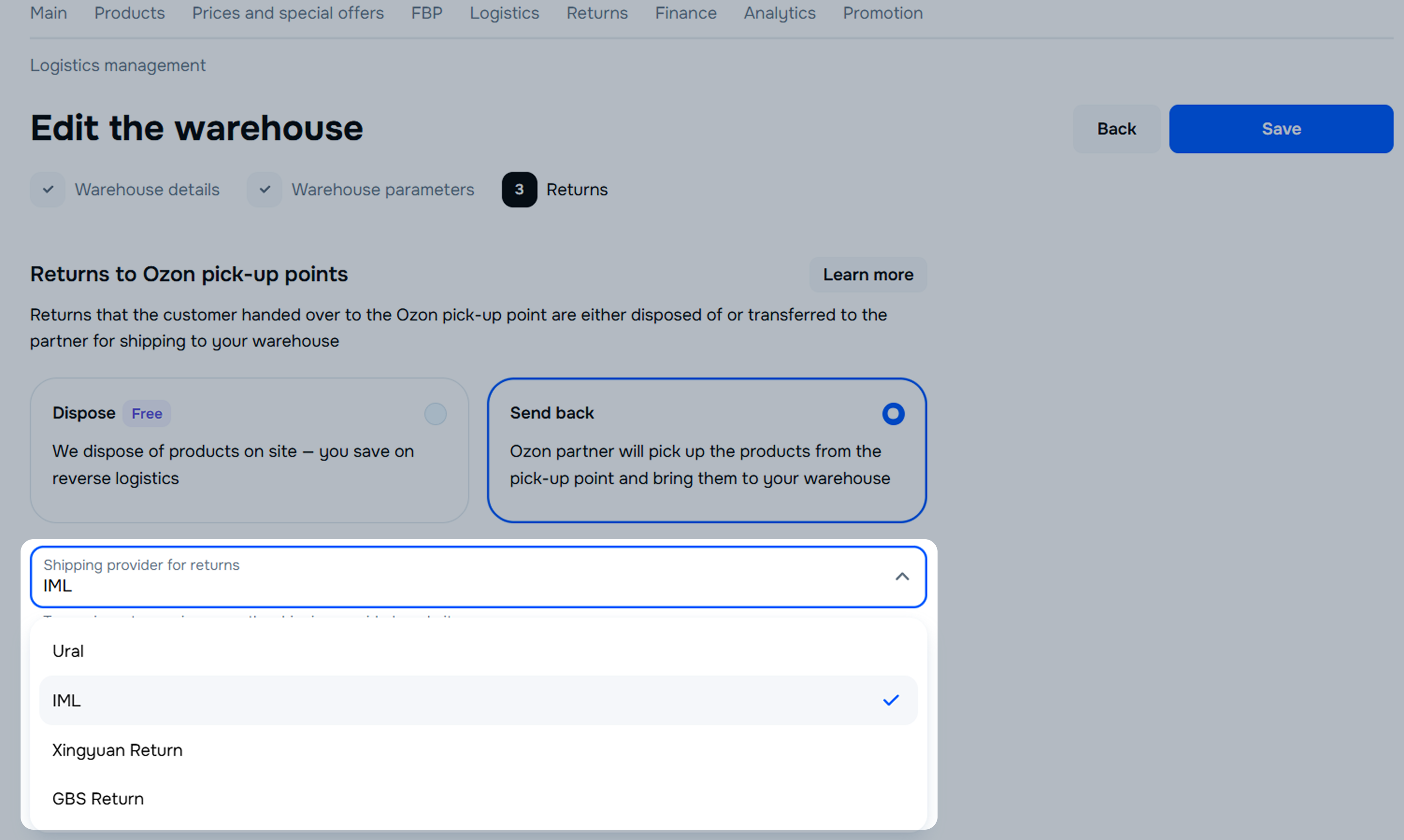
To find out which return partner is enabled, click on the warehouse name on the Logistics → Logistics Management tab.
Learn more about optimizing return logistics and changing direct and return flow partners
Learn more about registering and creating an order for processing
You can view details about returned products in the returns report.
This method is only available for customer returns delivered to CIS countries, for bulky products, or if there are no Ozon pick-up points in the customer’s area.
In Logistics → Logistics Management, click Edit and in step 3 in the “Returns by Agreement with Customer” block, set the return pick-up address.
Learn more about setting up a warehouse for receiving returns
Hide menu
Show menu
Выберите договор

Это база знаний для продавцов из стран СНГ и дальнего зарубежья.
Если ваша компания зарегистрирована в России, перейдите в базу знаний для продавцов из России.
Когда вы зарегистрировались на Ozon?
Условия работы и инструкции зависят от даты заключения договора — её можно посмотреть в разделе Договоры
Определили ваш договор
Он заключён с ООО «Интернет Решения». Если есть другой договор, сможете переключиться на него в боковом меню
