
Определили ваш договор
Он заключён с ООО «Интернет Решения». Если есть другой договор, сможете переключиться на него в боковом меню
Premium Lite is a subscription for sellers that can be arranged as an additional service in the seller’s personal account.
Premium fee is charged monthly as a single payment. When subscribing, the payment is deducted immediately – your balance must have sufficient funds for the payment. If you are unable to subscribe, please check that your balance has sufficient funds. You can do this in your personal account in the Finances → Balance section. You can track charges in the Finances section and in the monthly completion certificate.
For example, if you subscribed on June 15, we will deduct the payment for the first month on the same day, and the next payment will be on July 15.
For sellers who have not used a Premium subscription before, we have made the trial period free to make it easier to understand the rules.
To subscribe to Premium, you must pass Ozon’s internal verification. For security reasons, we do not disclose the verification criteria to prevent fraudsters from gaining access to the subscription’s benefits.
If you have passed the verification, an invitation banner will appear in the Premium section. It will be displayed on the page as long as you meet all the conditions. To subscribe, open  → Premium and click Subscribe in the Premium Lite block.
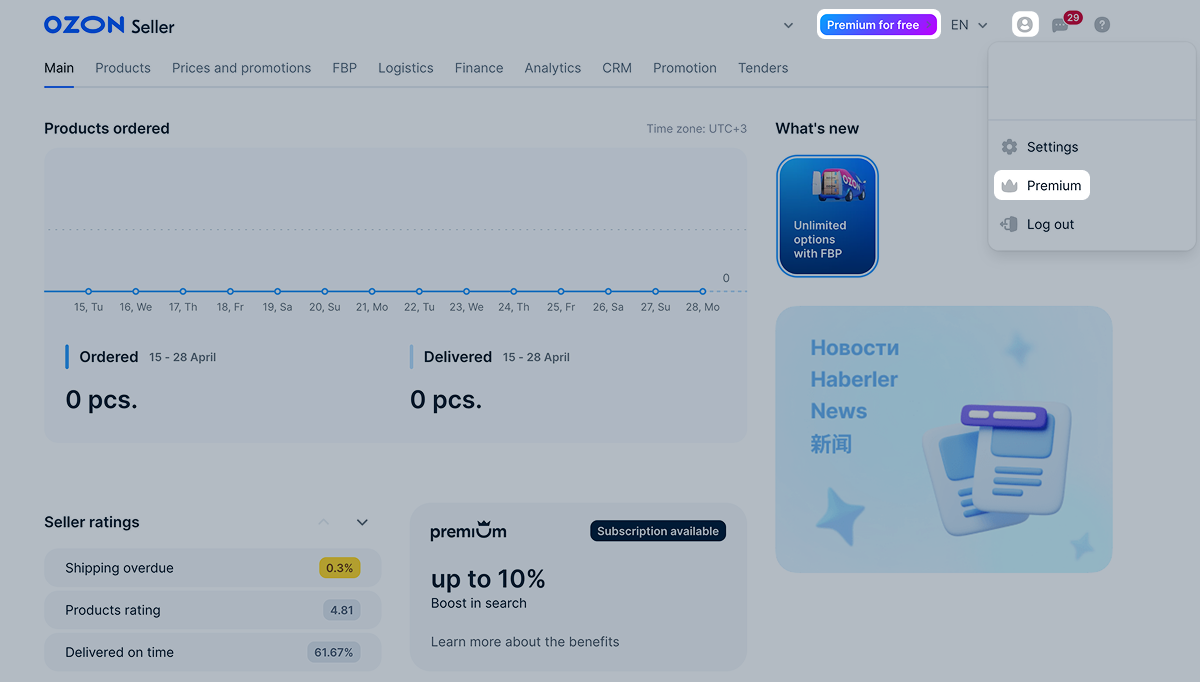
Only users with the “Manager” and “Administrator” roles can accept the invitation. If the banner is displayed but you cannot activate the service, contact your supervisor.
You can cancel your subscription at any time. To do this, go to the Settings → Contracts section and scroll down to the Premium for Sellers block and click Disable subscription.
The subscription benefits will remain until the end of the paid or trial period. For example, you subscribed on October 6, and on October 19 you decided you do not want to renew it. If you cancel the subscription, it will remain active until the end of the paid period – that is, until November 6. Until then, you can use advanced analytics, and your products with a favorable price index will rank higher in search.
If within 14 days the balance:
You can manage automatic subscription renewal in the Settings → Contracts section.
Hide menu
Show menu
Выберите договор

Это база знаний для продавцов из стран СНГ и дальнего зарубежья.
Если ваша компания зарегистрирована в России, перейдите в базу знаний для продавцов из России.
Когда вы зарегистрировались на Ozon?
Условия работы и инструкции зависят от даты заключения договора — её можно посмотреть в разделе Договоры
Определили ваш договор
Он заключён с ООО «Интернет Решения». Если есть другой договор, сможете переключиться на него в боковом меню
