

Определили ваш договор
Он заключён с ООО «Интернет Решения». Если есть другой договор, сможете переключиться на него в боковом меню
Ozon partner delivery is a platform that helps sellers around the world interact with shipping providers.
We publish the delivery terms in advance. If the new rules haven’t yet come into effect, use the previous version.
Available delivery methods depend on the warehouse type and work schedule:
Learn more about shipping by China Post
Rates and delivery time from March 7, 2026 (XLSX)
From February 10, 2026, UNI delivery methods are no longer available for connection. The partner processes the products that were sent to them before the switch.
Rates and delivery time from March 25, 2026 (XLSX)
There are several groups of partner methods for realFBS warehouses: Extra Small, Budget, Small, Big, Premium Small, Premium Big, postal shipment, and delivery of products over 30 kg. They are based on the weight and cost of products in the shipment.
To be able to sell your products in both one and multiple items, add 1 delivery method for each of the 6 shipment groups. In total, you should add 6 delivery methods for each warehouse.
If you add postal shipment methods to your warehouses, you expand your sales geography, and customers don’t have to specify their passport details when placing orders.
Learn more about setting up delivery methods

Rates and delivery time from December 17, 2025 (XLSX)
You can check the shipping cost using the calculator.
When choosing a shipping method, make sure that the products aren’t included in the list of products prohibited for sale. Otherwise, a shipping provider doesn’t accept the order.
On January 14, 2026, we start switching to the new label format. It changes from 12 × 7.5 cm to 4 × 5.8 cm.
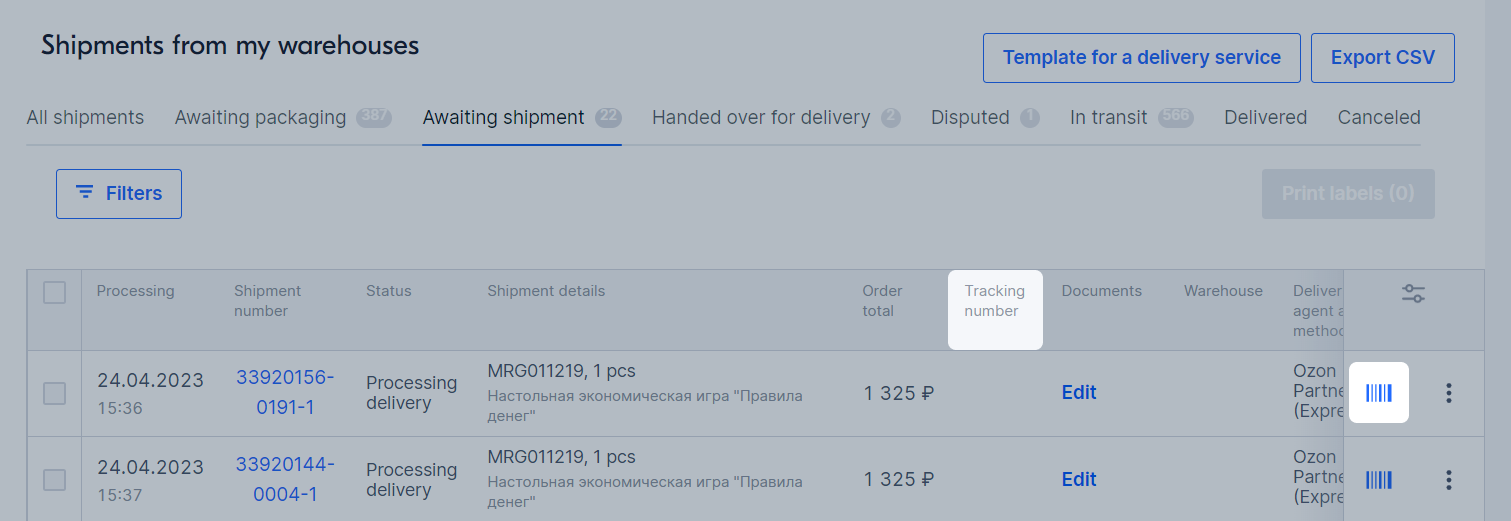
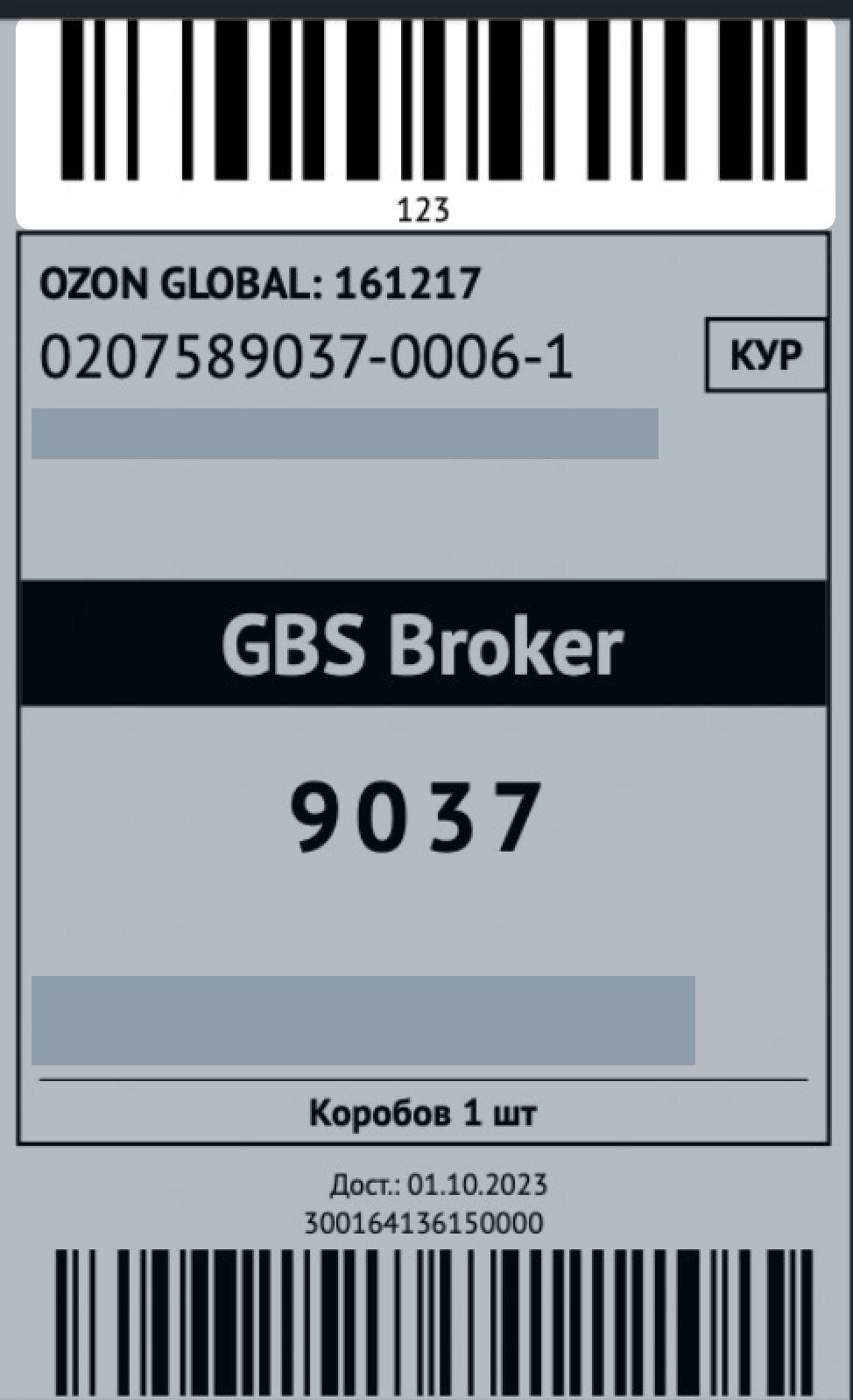
Print the label for each order following the requirements:
The A, B, C, D, E, or F letters at the bottom right of the upper barcode indicate the customer location according to the internal Ozon cluster system. The cluster system helps to organize order delivery and makes logistics more efficient. Clusters don’t affect the shipment processing priority.
Use only the upper barcode for operations in your warehouses. The lower barcode is needed for product accounting in our internal systems for identification, accounting, and and issuing the product to the customer.
If you don’t deliver the order to the drop-off point on time, it will negatively affect the delivery terms and customers attitude.
Such orders appear on the Disputed tab.
At the next stages, everything is controlled by Ozon, including:
You can’t change the tracking number if you choose Ozon partner delivery.
If the shipping provider doesn’t accept the order, it’ll switch to the “Not accepted on the DC” status. You can open a dispute. After the dispute is resolved, the order will be canceled, or you will be able to re-ship it.
Warehouse delivery options may be changed if:
There are errors that don’t let the Customer place an order, or deliver the product to the Customer.
If the method for delivering shipments of particular size or price has not been added to your warehouse, customers won’t be able to place their orders. In this case, Ozon may add a suitable method to the warehouse and notify you of that.
Invalid delivery method
You have a product one piece of which refers to the Small group in terms of weight and price. If you haven’t added the Small group method to the warehouse with this product, customers won’t be able to place an order.
Other delivery methods for orders with several product items haven’t been added
You have a product that refers to the Extra Small group in terms of weight and price. A customer orders several pieces of this product, and your shipment is switched to the Small group due to the increased order price. If you haven’t added the Small group delivery method to the warehouse with this product, the customer won’t be able to place an order. To let customers order different product combinations, add at least 1 delivery method for each of the 6 shipment groups to your warehouse: Extra Small, Budget, Small, Big, Premium Small and Premium Big.
Other delivery methods haven’t been added after previously specified method had stopped working
A delivery method that will stop working soon has been added to your warehouse. After if stops working, there won’t be any active delivery methods at your warehouse, so customers won’t be able to place their orders. Ozon may add a suitable delivery method before the previous method stops working and will notify you in advance.
When expanding the delivery geography and/or adding new delivery methods for these countries.
Ozon expands the product delivery geography to new countries to increase your sales. To deliver the products to these countries, Ozon may add a suitable delivery method to your warehouse and will inform you about it beforehand.
If the added delivery method are not suitable for you, change them in the warehouse settings.
You can check the delivery methods from warehouses in your account in Logistics → Logistics management and Methods in the Delivery Methods from This Warehouse block.
Learn more about delivery method management
List of partners and pick-up points (XLSX)
In case of shipment cancellation, contact the shipping provider directly. Some shipping providers offer pick-up service. Contact your shipping provider to learn more about the service.
Available delivery methods depend on the warehouse type and fulfillment scheme.
From February 10, 2026, ASE-UNI delivery methods are no longer available for connection. The partner processes the products that were sent to them before the switch.
Rates and delivery time from March 25, 2026 (XLSX)
When choosing a shipping method, make sure that the products aren’t included in the list of products prohibited for sale. Otherwise, a shipping provider doesn’t accept the order.
On January 14, 2026, we start switching to the new label format. It changes from 12 × 7.5 cm to 4 × 5.8 cm.
Print the label for each order following the requirements:
The A, B, C, D, E, or F letters at the bottom right of the upper barcode indicate the customer location according to the internal Ozon cluster system. The cluster system helps to organize order delivery and makes logistics more efficient. Clusters don’t affect the shipment processing priority.
Use only the upper barcode for operations in your warehouses. The lower barcode is needed for product accounting in our internal systems for identification, accounting, and and issuing the product to the customer.
If you don’t deliver the order to the drop-off point on time, it will negatively affect the delivery terms and customers attitude.
Such orders appear on the Disputed tab.
At the next stages, everything is controlled by Ozon, including:
You can’t change the tracking number if you choose Ozon partner delivery.
If the shipping provider doesn’t accept the order, it’ll switch to the “Not accepted on the DC” status. You can open a dispute. After the dispute is resolved, the order will be canceled, or you will be able to re-ship it.
Warehouse delivery options may be edited when the delivery geography has expanded and/or new delivery methods have been added for these countries.
Ozon expands the product delivery geography to new countries to increase your sales. To deliver the products to these countries, Ozon may add a suitable delivery method to your warehouse and will inform you about it beforehand.
If the added delivery method are not suitable for you, change them in the warehouse settings.
You can check the delivery methods from warehouses in your account in Logistics → Logistics management and Methods in the Delivery Methods from This Warehouse block.
Learn more about delivery method management
List of partners and pick-up points (XLSX)
In case of shipment cancellation, contact the shipping provider directly.
Available delivery methods depend on the warehouse type and work schedule.
When choosing a shipping method, make sure that the products aren’t included in the list of products prohibited for sale. Otherwise, a shipping provider doesn’t accept the order.
On January 14, 2026, we start switching to the new label format. It changes from 12 × 7.5 cm to 4 × 5.8 cm.
Print the label for each order following the requirements:
The A, B, C, D, E, or F letters at the bottom right of the upper barcode indicate the customer location according to the internal Ozon cluster system. The cluster system helps to organize order delivery and makes logistics more efficient. Clusters don’t affect the shipment processing priority.
Use only the upper barcode for operations in your warehouses. The lower barcode is needed for product accounting in our internal systems for identification, accounting, and and issuing the product to the customer.
If you don’t deliver the order to the drop-off point on time, it will negatively affect the delivery terms and customers attitude.
Such orders appear on the Disputed tab.
At the next stages, everything is controlled by Ozon, including:
You can’t change the tracking number if you choose Ozon partner delivery.
If the shipping provider doesn’t accept the order, it’ll switch to the “Not accepted on the DC” status. You can open a dispute. After the dispute is resolved, the order will be canceled, or you will be able to re-ship it.
Warehouse delivery options may be edited when the delivery geography has expanded and/or new delivery methods have been added for these countries.
Ozon expands the product delivery geography to new countries to increase your sales. To deliver the products to these countries, Ozon may add a suitable delivery method to your warehouse and will inform you about it beforehand.
If the added delivery method are not suitable for you, change them in the warehouse settings.
You can check the delivery methods from warehouses in your account in Logistics → Logistics management and Methods in the Delivery Methods from This Warehouse block.
Learn more about delivery method management
List of partners and pick-up points (XLSX)
In case of shipment cancellation, contact the shipping provider directly.
Rates and delivery time from India, Poland, Latvia, Mongolia, Germany, Italy, Spain, France, the UK and Lithuania: rates and delivery time from March, 12 2026 (XLSX).
When choosing a shipping method, make sure that the products aren’t included in the list of products prohibited for sale. Otherwise, a shipping provider doesn’t accept the order.
On January 14, 2026, we start switching to the new label format. It changes from 12 × 7.5 cm to 4 × 5.8 cm.
Print the label for each order following the requirements:
The A, B, C, D, E, or F letters at the bottom right of the upper barcode indicate the customer location according to the internal Ozon cluster system. The cluster system helps to organize order delivery and makes logistics more efficient. Clusters don’t affect the shipment processing priority.
Use only the upper barcode for operations in your warehouses. The lower barcode is needed for product accounting in our internal systems for identification, accounting, and and issuing the product to the customer.
If you don’t deliver the order to the drop-off point on time, it will negatively affect the delivery terms and customers attitude.
Such orders appear on the Disputed tab.
At the next stages, everything is controlled by Ozon, including:
You can’t change the tracking number if you choose Ozon partner delivery.
If the shipping provider doesn’t accept the order, it’ll switch to the “Not accepted on the DC” status. You can open a dispute. After the dispute is resolved, the order will be canceled, or you will be able to re-ship it.
List of partners and pick-up points (XLSX)
In case of shipment cancellation, contact the shipping provider directly.
Hide menu
Show menu
Выберите договор

Это база знаний для продавцов из стран СНГ и дальнего зарубежья.
Если ваша компания зарегистрирована в России, перейдите в базу знаний для продавцов из России.
Когда вы зарегистрировались на Ozon?
Условия работы и инструкции зависят от даты заключения договора — её можно посмотреть в разделе Договоры
Определили ваш договор
Он заключён с ООО «Интернет Решения». Если есть другой договор, сможете переключиться на него в боковом меню
