
Additional rules, conditions, and laws may apply when ordering products from foreign sellers. The carrier must declare personal use products to import them into a country. To do this, they or customs employees fill out a passenger customs declaration. Ozon asks for personal details in your account and passes them to the carrier or customs to fill out the declaration. Ozon stores personal details until the customer receives the order.
If you don’t provide personal details within 24 hours after paying for the order, we’ll cancel it.
You can provide personal data immediately after placing an order or on its page in the order list.
If you fill out your personal data via Ozon ID, it’s saved for future orders.
Specify personal details
Specify the data of the person who receives the order.
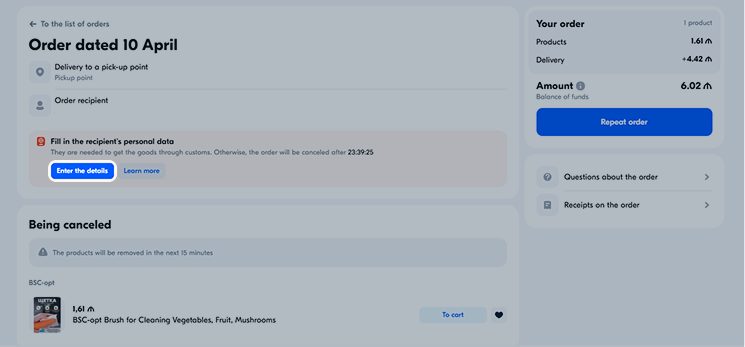
- After making a payment, on the order page or in the Orders section, click Enter the details.
-
Enter the recipient details:
- full name in Latin,
- FIN code,
- Azerbaijani phone number.
If you want your personal data to be used for future orders, give your consent to its storage and processing by Ozon.
-
Click Save.
- After making a payment, on the order page or in the Orders section, click Enter the details.
- Enter the recipient details:
- If the recipient is a citizen of Georgia, enter their full name in Latin, personal identification number (ID), Georgian tax number, and Georgian phone number.
- If the recipient is a citizen of another country, enter their full name in Latin, passport series and number, Georgian tax number, and Georgian phone number.
If you want your personal data to be used for future orders, give your consent to its storage and processing by Ozon.
- Click Save.
If you enter the details incorrectly, you can edit them before the order status changes to “On the way”. A delivery company representative may contact you to clarify provided personal details.
After saving the data, declare the order. Orders without declaration don’t clear customs.
Learn more about order declaration
Save personal data via Ozon ID
-
In your account, in the left corner click Edit profile.
-
On the profile data page, click Change in Ozon ID.
-
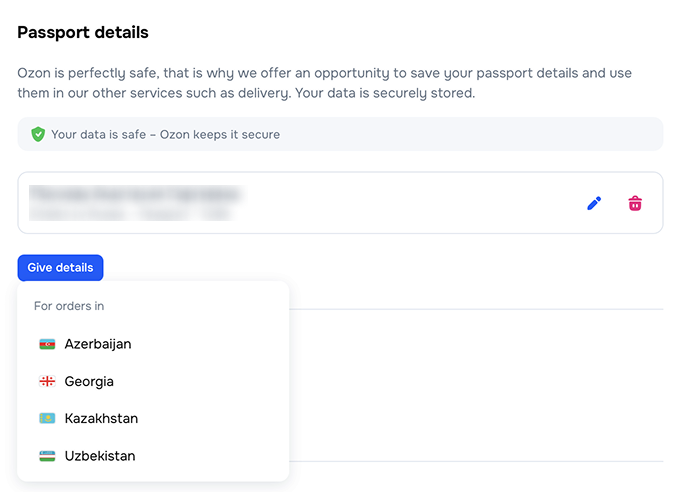
In the Passport details section, click Specify details and select the country for which you want to provide your personal data.
-
Depending on your citizenship, fill out your personal data.
If you want your personal data to be used for future orders, give your consent to its storage and processing by Ozon.
-
Click Save.
Your data appears on the Ozon ID page, in the Passport details section.
To change the data, click  .
To delete it, click
.
To delete it, click  .
.
To fill out the personal data for an order that you’ve already placed, open the Orders section and select the necessary one.