
Определили ваш договор
Он заключён с ООО «Интернет Решения». Если есть другой договор, сможете переключиться на него в боковом меню
With the “Where the product is in the search” tool, you can find out whether your products are displayed in search results on Ozon.
 Learn more about Ozon ID
The status is displayed for each product. If the product is in search results, you can see its position.
The product position is shown for the time the table is generated at. Many factors influence search results, so product positions change regularly.
Learn more about Ozon search
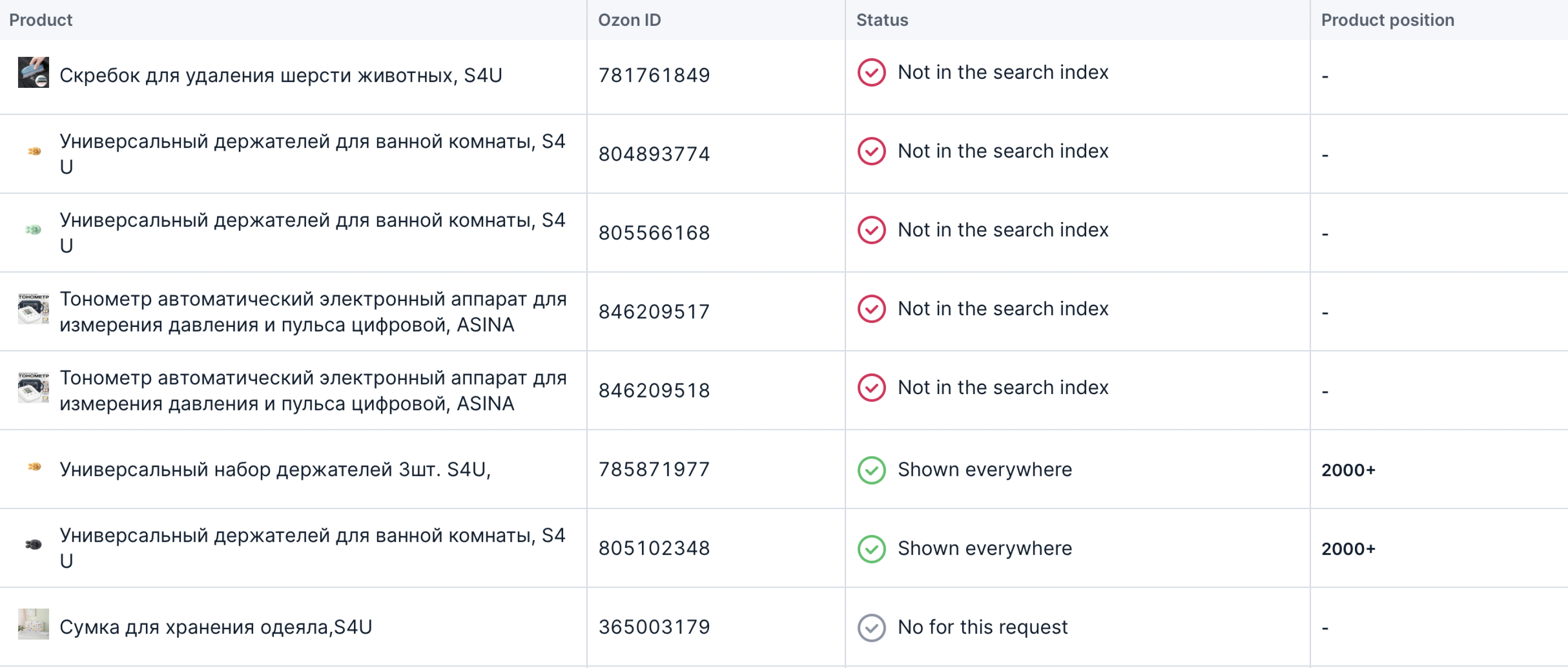
| Status | Description |
|---|---|
 Shown everywhere except Android
 |
Customers don’t see the product from Android devices. |
|
Shown everywhere except iOS |
Customers don’t see the product from iOS devices. |
 Shown everywhere
 |
All customers see the product based on the selected parameters. |
 No for this request
 |
Customers don’t see the product based on the selected parameters. |
 Not in the search index
 |
An error occurred during indexing. Possible reasons: • The product is out of stock for more than 30 days. Replenish the stocks. • There are errors in the PDP. See the report to find out how to fix them. • Product is blocked for violations. |
Hide menu
Show menu
Выберите договор

Это база знаний для продавцов из стран СНГ и дальнего зарубежья.
Если ваша компания зарегистрирована в России, перейдите в базу знаний для продавцов из России.
Когда вы зарегистрировались на Ozon?
Условия работы и инструкции зависят от даты заключения договора — её можно посмотреть в разделе Договоры
Определили ваш договор
Он заключён с ООО «Интернет Решения». Если есть другой договор, сможете переключиться на него в боковом меню
